Grab this Widget ~ Blogger Accessories
Your Ad Here

Showing posts with label Messaging. Show all posts


Advanced Blocker is all-in-one solution to help you filter unwanted voice calls, video calls, text messages, MMS and WAP Push messages.

You no longer need to turn off your phone just to avoid interruptions – just enable Advanced Blocker and leave it to the software to filter unwanted and unimportant calls and messages while you enjoy your privacy.

Features include:

* Silent instant reject of all blacklisted numbers, number patterns and text rules
* Auto-start mode - option to automatically start-up AB after phone restart
* Blocking of fixed numbers or groups of numbers (wildcard * number filters)
* Discreet activity indicator on the phone’s stand-by screen
* Various contact import options – import from the phone’s log, from phone’s contact book, manual import
* Blocked history log for detailed history of filtered events
* Visual indicators providing instant overview of all new blocked events in the blacklist rules main screen
* Blocked messages can be easily viewed and restored
* Full reject entry log with details screen for each blocked event
* Customizable reject options for blacklisted contacts – you can select what kind of events to accept or reject from each number – calls, SMS, MMS, WAP push messages.

Download here:

Easy-Share

Ziddu

Read more and download...


The scope of this utility is to save all the sending and receiving messages in separated files...

Download here:

Easy-Share

Ziddu

KewlShare

Read more and download...


Description about IndiSMS
You can send SMS with the same phone, same keypad BUT in INDIAN language. IndiSMS 9 Language version for series-60 phones. The supported Indian languages are Hindi, Marathi, Punjabi, Gujarati, Bengali, Telugu, Kannada, Malayalam and Tamil. The messages are sent in International standard “Unicode” text format and are compatible with most of the handsets sold in India.


IndiSMS is an easy-to-download mobile application. It allows the user to type the message in a phonetic manner using the English alphabet, while the Indian language equivalent appears above as the user types. For creating a message, IndiSMS uses transliteration or what is also called as ‘Phonetic Entry’. IndiSMS works even on mobile handsets that do not otherwise support Indian language display.


Text typed as ‘namaskaar’ appears as hindi Eterno Infotech Indisms V2.00 S60v3 or kanada Eterno Infotech Indisms V2.00 S60v3 as per the selected language.Apart from offering phonetic text entry, IndiSMS solves the problem of local language display (like Hindi on Series-60) on existing handsets which do not support Indian Language display.


Supported Languages
Hindi, Marathi, Punjabi, Gujarati, Bengali, Telugu, Kannada, Malayalam and Tamil

IndiSMS Supported Handsets
For series 60v3 phones:
N73, N71, E65, N76, N81, N81 8GB, N92, N93, N93i, N95 8GB, N95, 6610 Navigator, 5700 XpressMusic, E50, E51, E61, E62, E61i, E60, N80, E90, 3250, N91, N91 8GB

Handsets that display incoming Indian Language SMS without IndiSMS
Phones supporting display of Hindi/Marathi and some Indian Languages SMS**-
Samsung-D500,N700,SCH-N380,SGH-E810,SGH-X460,SGH-X100,SGH-C200,SGH-C210,SGH-C230,SGH-D410,SGH-D500,SGH-E600,SGH-E630,SGH-E800,SGH-E810,SGH-N700,SGH-S500,SGH-X100,SGH-X460,SGH X480,SGH-X600A,SGH-X640
Motorola-C139,W210,C155,W170
Sony Ericsson-K300i,T290i,J300i,K300i
**Kindly check the manual for languages supported

Note: IndiSMS new version 2.0 is now available for download (Released - 14 May 2008). It features intelligent self learning smart dictionary and virtual keypad. Keep visiting this site for the next version soon with more new features.

Currently there are no charges for downloading or using IndiSMS application.

* Free Download
* Free Activation - 1 standard SMS charge to get activation code
* No additional charges for SMSs sent through IndiSMS

Download here:

Ziddu

KewlShare

Read more and download...


Only few people know that better phones are able to save information about realized calls or sent or received SMS into two independent lists. You can delete message but more advanced user is able to find information about its sending in another list. Similar situation is with calls. Your troubles can arise if somebody unwanted gets hold of your mobile phone. You avoid it by installing and well setting application Black & White Guard which automatically cleans up confidential data from your mobile phone. Those data including SMS are easy accessible only for you after entering the password.

Black & White Guard has another useful functions, like the Black list and mobile phone keyboard locking.
How does Black & White Guard work?

* It hides information about dialed numbers and SMS from White List.
* It rejects calls and SMS from Black List.
* It is very, very simple to use.

You may pre-set an automatic call refusal for certain telephone numbers on your Black list, and delete all SMS messages (not MMS).

The application runs in the background on its own, is not listed in the directory of regular applications and automatic start of the application may be pre-set after turning the telephone on - in Autostart.

Another part of the application is the option of setting automatic keyboard blocking in case the device is not being used (between 30 - 300 seconds).

Download here:

http://www.ziddu.com/download/4121436/dWhitev1.30S60v3SymbianOS9.1UnsignedCracked-CFFPDA.rar.html

http://kewlshare.com/dl/aed9a4fe7f96/ISO-8859-1__CMI_Technologies_Black_And_White_v1.30_S60v3_SymbianOS9.1_Unsigned_Cracked-CFFPDA.rar.html

Read more and download...


Up to 10 email addresses:
You can access up to 10 of your personal email accounts.
Each email arrives in its own mailbox, and you can access all emails in one place.

Nokia Messaging supports thousands of leading global and local email providers.

New in Nokia Messaging 1.1:
Get emails in HTML format.
Sign up with your Windows Live TM Hotmail® email address.
Now available on four more phones.
Available in 23 languages.

Download here:

http://www.ziddu.com/download/4105655/ISO-8859-1__NokiaMessaging_Symbian60V31.zip.html

http://kewlshare.com/dl/acfeeb57ee5c/ISO-8859-1__Nokia_Messaging_Symbian60V31.zip.html

Read more and download...


You can’t remember your account numbers, phone numbers of miscellaneous SMS services? You forgot syntax or commands of your mobile payment services? You have no time for typing for car parking or to buy train ticket by SMS? Me to.
If you use SMS-based parking, payment or information services, or have SMS controllers (Home automation, Alarm systems, door control etc.), then BuiltSMS is essential.
Revolutionary SMS builder BuiltSMS let you create the active SMS template using Constant Strings, Choice Groups, Text Fields, Date Time pickers and Gauges and send it. You can build new active templates or edit existing, direct on your phone.

How it works
On example you start parking your car with license plate number BQH2332 in zone 200345.
Car parking command: START BQH2332 200345
Traditionally, you should write whole message or select it from constant templates, edit, select the service number and send SMS.
BuiltSMS let you send SMS in a few clicks:
Select the active template. e.g. - Parking.
Select the car from choice group of names. e.g. -Toyota.
Select the parking zone from choice group of names. e.g. - Cinema.
Click Send.
BuiltSMS will compose SMS and send it to the service phone number.

Major Features

* backup and restore all groups of active templates to file
* save and open separate group from file
* download the group from web
* context sensitive menu and help
* auto save last choices and entries

Minimum Requirements

* MIDP 2.0 CLDC 1.0
* JSR-120 ( Wireless Messaging API )
* JSR-075 ( File Connection )

Download here :

http://www.easy-share.com/1904262971/Viktors.Strelcs.BuiltSMS.v1.00.S60.Java.Cracked-BiNPDA.rar

http://www.ziddu.com/download/4077738/ViktorsStrelcsBuiltSMSv1.00.S60JavaCracked-BiNPDA.rar.html

Read more and download...


It has the following functions:

1 Phone call management

a. Reject all incoming calls. In this mode, all of the incoming call will be automatically rejected. It can be used in the time when a user does not want to be disturbed (for example, when a user is driving a car or having a meeting)
b. Accept only recognized call. In this mode, all of the unknown calls will be rejected; those recognized calls (names are already stored in the phonebook/contacts) will be not affected.
c. Reject calls from blacklist.In this mode, all of the calls from the predefined blacklist will be automatically rejected, whereas the rest of the calls will not have any effect. An end user can make use of "Manage Lists" function to create the needed blacklist. This can be used in the situation when a user does not want to be harassed from some people.
d. Accept call from whitelist. In contrast to the previous one, in this mode, mobile only accept calls from the predefined whitelist. All of the other calls from non-whitelist will be automatically rejected. An end user may use "Manage Lists" function to create the needed whitelist.
e. Personalized call rejection. In this mode,an end user may define personalized call rejections for each of the members in the "Specific List". A user may select "Reject call", "Reply by SMS" or "Greeting" options to reject calls. A user may use "Manage Lists" to create his/her "Specific list".

2 Hide and Manage SMS

a. "PCG" can help to manage the SMS messages in the mobile phone to make the needed messages visible or invisible in the "Inbox/Sent" of the Nokia "Messaging" application. In this case, a user can hide the sensitive information even your phone is lost, or the user does not want to share the information with others.
b. An end user may create his/her "Baby list" using "PCG". Once the "Baby list" has been set up, in the next start-up of "PCG", it will automatically scan all of the existing short messages. If a message is to from the "Baby list", then messages will be automatically hidden. In addition, it can also automatically hide the short messages from "Baby list" if it is running. This will eventually protect the user's privacy since others cannot view the SMS without supplying a correct password. A user can set his/her password in "Active mode". When an SMS from "Baby list" comes in the mobile phone icon on the top-left corner of the screen will keep blinking until the user has entered the "Manage SMS" / "Call Records" area using "PCG".

3 Hide and Manage Phone call log

* All of the phone call records from "Baby list" will be automatically hidden. A user can ONLY view the phone call record by inputting a correct password.
* When a call from one of the member in the "Baby list" comes in, if it is not answered, then a small "mobile phone icon" will keep blinking until the user enters either "Manage SMS" or "Call Records" area with a correct password provided.

4 Phone call recording

&nbspWhenever a call has been establish (in whichever user interface), if a user wants to record the caller's voice (for example, please tell me your phone number or your home address, then I can record it down), the user just simply needs to simultaneously press "ABC" key(on which has a pen icon) and "+" key, "PCG"will automatically invoke the "Recorder" application in S60 to record the telephony voice. As such, t the caller's voice and the user's voice will be recorded simultaneously. A user may the functions from the recorder to "Stop", "Pause" or "Continue" to record the voice. Note:For those S60 phones, which has the "QWERTY" keyboard layout,a user needs to use "CTRL+A" key combination to activate the telephony voice call recording. Currently, Nokia S60 E61 has the keyboard layout.

5 Automatic call rejection

&nbspWhen this function is used, all of the incoming calls will be automatically rejected. If the caller uses a mobile phone to make the call,then the caller may receive a customized SMS message. This is especially useful when a user does not want to be disturbed; however,he/she still wants the caller to get some information about the callee. A user may choose an SMS template like "I am driving call"or "I am having a meeting now, please do not disturb me"as a reply.

6 Automatic removal of the SMS message from the blacklist

&nbspA user may define his/her own "SMS Blacklist". In this case, all of the SMS from the blacklist will be automatically removed when the SMS message come in. This function is very useful when a user does not want to receive those harass SMS messages or advertisement SMS messages.

7 Keyboard autolock

&nbspA user may define a time interval for "Autolock time interval"。When keyboard is not used within the time, then "Call Manager" will help to lock the keyboard automatically.

8 Quick key lock function

&nbspExcept the time when a call is established, no matter whichever user interface a user is currently in, the user may simultaneously press "ABC" key(on which there is a pen)and "+" key to activate the quick key lock function. The benefit of this function is that a user does not to switch to the "Idle screen" in order the lock the keyboard. Another benefit of this function is that it can help us to quickly lock whichever screen. Note:1) For some of the S60 phones, when this quick key lock function is activated, after key lock is deactivated in the active idle screen, a user may not see the left/right soft keys in the screen. If this happens, a user may press any of the numeric keys in the phone to recover this situation, or a user may choose to use the S60 standard way ("left soft key" + "+" key) to activate the key lock function since this ONLY happens in the active idle screen 2) For those S60 phones, which have the "QWERTY" keyboard layout, a user must use "CTRL+A" key combination to activate the telephony voice recording。Currently, Nokia E60 uses the keyboard.

9 File security

&nbspA user may use the left and right soft key to browse the directories in the phone, and the user may choose the files to encrypt or decrypt.

10 Auto start enable

By default, this application is auto-started.

11 It can hide itself in the task manager and don't let the others know

Download here :

http://www.easy-share.com/1904169914/SymbianOn.Call.Manager.v5.10.S60v3.SymbianOS9.x.Unsigned.Cracked-DiL.rar

http://www.ziddu.com/download/3990706/lManagerv5.10.S60v3SymbianOS9.xUnsignedCracked-DiL.rar.html

Read more and download...


Tired of having to press a button in order to see if you have missed a message or a call - each time when you have left your phone alone for some time? SMSBlink makes you notice right at a glance! With SMSBlink, the keyboard (or screen) light will start blinking silently after there has been a new messages or a call that you have not noticed. Finally, your phone will be as useful as a regular answering machine! And like a regular answering machine, your phone will just be blinking silently - just so that you know there is a message, and can choose to attend to it whenever you wish!

SMSBlinks replaces the normal screensaver whenever the system notification about new messages or calls has been on display for more than 30 seconds. In this case, the screen goes black and the keyboard light starts blinking. (Alternatively, you can choose to have the display backlight flash. In this case, the screensaver displays an icon that will be lit up every 10 seconds.) In order to see the sms/call notification, simply press the “OK” button or slide the phone open. If you then choose to cancel the notification, SMSBlink knows that you wish to take care of the message/call later, so it will not start again. Also, when a message or call arrives while you are currently in an app, SMSBlink assumes that you have taken notice, and will not become active. SMSBlink will activate only when the phone is in idle mode (i.e. the idle screen is visible). SMSBlink can be deactivated any time by selecting it from the list of running apps (hold down Menu key).

Download PhonePhreak Software SMSBlink v1.28

http://www.easy-share.com/1904153620/PhonePhreak Software SMSBlink v1.28.rar

http://www.ziddu.com/download/3976276/PhonePhreakSoftwareSMSBlinkv1.28.rar.html

Read more and download...


TOTAL PATROL (Watch Total) v2.1.25 unsigned {missedcall,unread sms reminder} 22/03/09

Total Watch 2.1.25

Changes in documentation

Corrected errors
# Light-emitting diode continued to blink after the end of the signal of the illumination
# With the blocked keyboard did not blink the screen during the signal by illumination to Nokia 5800
# Small changes in the titles in the Russian language.

A program to remind about all the missed events.It works on all versions of Symbian v3. Including my Nokia 5800

Now supports:
#Fixed a bug where the guard does not stop after viewing the missed call log.
#Ignored post. SMS, MMS, Bluetooth Recalls Missed SMS, MMS, Bluetooth communications.
#Low charge and the end of battery

Significantly enhance the ability of your alert. You can use three kinds of signals: sound, vibration, illumination. When you set each alarm can be configured: the volume, taking into account the profile, alarm time, rhythm vibrosignala and lights. And you can customize the alerts for each of otlezhivaemyh events, and as soon as possible for all.

Included requests:
#Playing the melody from the list at the moment of choice tunes.
#Expand the possibilities for setting up the sound. Make a general setting for the entire program, but for each of the alerts, you can choose: to use a general or a private scheme to set up alerts.Give the opportunity to designate the volume signal. Consider that in the profile is selected increscent signal. Ability to specify a time period in which you can send a signal.
#Replace the signal-to-point vibration on the vibration-tire.One signal is short, the next longest.The interval between the signals does not change.
#Include a message to one-time flashing screen when the screen lights up briefly on a couple of seconds and slowly extinguished.
# For each type of signal (sound, vibration, flashing) to adjust the alarm period.
# The first reminder for calls and SMS to be over a given period, a reminder of the lowest grade immediately.
I want to say thank you to everyone who helped me in developing the program. Without your help, your ideas without a watch would not have been so good. Icons and sounds:
# Pasha Joymaker - Icons Watch this person and it turned out very nice. New sounds was reached super stylish. I replaced his lobster at "Silent 2.

Download TOTAL PATROL (Watch Total) v2.1.25 Unsigned

http://www.easy-share.com/1904153057/ISO-8859-1__TotalPatrol.unsigned.2.1.25.s60v3x.zip

Read more and download...


Mojos Mobile PhotoInbox v1.10*Cracked*

Release Group ..............: BiNPDA
Version ....................: v1.10
Size .......................: 280 kb
Operating System ...........: S60v3 - SymbianOS9.1
Releasedate ................: 03-20-09
Filename ...................: bin-6829.zip
Disks ......................: 1

FullScreen Photo Notifications of received messages!

Do you feel bored of the received message notifications from Nokia Smartphones? And you would like to have a FullScreen Photo of the sender instead of a small text information? In that case PhotoInbox is the solution for you.

This innovative product offers:

* FullScreen Photos and Pictures for your Message Inbox
* Plus two more views: FullScreen Text and Normal Text size with Photo
* Own Message Editor
* Emotion Icons support
* Direct Call Back function
* Customizable User Interface
* Fully embadded in the operation system
* English and German version available
* Symbian Signed Certificated

R E L E A S E N O T E S

In order to install "Unsigned" releases, you need to go trough a one-time procedure. You will need to install the in the release included "SecMan.v1.1.SiS". This program allows you to install our "Unsigned" releases which are released after 05-16-08,without signing them every time. It also can do some hacking to the platform security, such as disable and enable it again.

This app should work on almost all S60v3 OS9.1/9.2 devices. Although, some newer firmwares block this method, so it will not work there. Do not use this when you don't know what you're doing. It may cause serious harm to your device.

When the installation is done, look in the Applications folder on your phone, and find SecMan. Open it, follow instructions, and after reboot open it again and click on "Install Root Certificate". Then you can install the .sis file by opening it on your device,or on your pc using pc suite.

Please keep in mind, if you format / upgrade your phones firmware, you'll need to do this step again and after that manually install those apps from Application Manager.

NOTE: To install previous unsigned releases, use RootSiGN v1.0 (Included in the BiNPDA.Security.Manager 1.10 release) first to sign these releases with our root certificate. Have fun with this release from team BiNPDA

Download Mojos Mobile PhotoInbox v1.10 S60v3 SymbianOS9.1 Unsigned Cracked-BiNPDA

http://rapidshare.com/files/211678726/Mojos.Mobile.PhotoInbox.v1.10.S60v3.SymbianOS9.1.Unsigned.Cracked-BiNPDA.rar

Read more and download...


SHAPE Services IMPlus v8.04 S60v3 SymbianOS9.x Cracked Illusion

Chat with IM+ All-in-One Mobile Messenger within AIM®/iChat, MSN®/Windows Live™ Messenger, Yahoo!®, ICQ®, Jabber®, Google Talk™ and MySpace® IM from your mobile device in real-time regardless of location and mobile operator.

Main Benefits:

* No cost per message, only standard payment for wireless data transfer.
* One-Time Purchase License: all further updates included.
* Smileys and avatars support.
* Message History. View correspondence with your contacts even when you're offline.
* Search in contact list and chat history.
* Template Messages. Send a messages using templates. Create your own templates for your messages
* Voice messaging and file transfer. Excellent alternative to MMS, send files and photos over GPRS.
* Full presence status support. Set your own status to give your contacts an idea of your mood.
* Contact list management functions including add/delete features.
* Layout aware. Screen renovation during the orientation change (portrait and landscape).
* Set up melody alert. Select the melody for messages received. Select the melody when another user gets online.
* Multiple dialog windows. Don't miss a moment, chat with several buddies simultaneously.
* Exchange messages in any language installed on a phone.
* Integrated help function. Easy to configure and easy to chat.

Download here :

http://www.easy-share.com/1904079821/ISO-8859-1__SHAPE Services IMPlus v8.04 S60v3 SymbianOS9.1 Cra cked-illusion.rar

http://www.ziddu.com/download/3912227/rvicesIMPlusv8.04S60v3SymbianOS9.1Cracked-illusion.rar.html

Read more and download...


Keep your secrets! Protect your privacy!
Control All Messages in your own hands!
Have you ever had the bad experience that your confidential SMS/MMS was seen by unwanted eyes? Are you still worring about keeping you secret SMS/MMS in you mobilephone? Stop all your anxieties now! Come to try this software!
MumSMS+ is a smart powerful software which offers you an easy way to protect your private and confidential messages in your mobilephone. All your sensitive SMS/MMS including sent,received and draft messages can be hidden automatically by choosing a proper profile. All your hidden messages are kept in good order and can be read only with right password.

Functionality:

* A fire-new, powerful, secure and easy-to-use messages managing UI(user interface).
* Protect(Hide) the received messages(SMS/MMS) automatically if user defined.
* Protect(Hide) the sent messages(SMS/MMS) automatically if user defined.
* Protect(Hide) the messages(SMS/MMS) in the draft folder automatically if user defined.
* Supported Hide/Show message of any folder by handy choose in message manager.
* Unlimited amount of user-defined profiles which can be switched at will.
* Supported two type of profiles: black lists (hide all message on list) and white lists (hide all except what are on the list)
* Any telephone no./contact person/prefix of telephone no. are allowed being added in the list of profile.
* Supported user-defined screen saver of message manager.
* Supported user-defined unread notification of automatical protection.
* Supported scanning of any folders to hide/show/apply-profile by handy operation.
* All hidden messages can be read only after right password input.
* All hidden messages are pretected in good order.
* All messages could be synchronized with other devices/network in your usual way.
* Every line within the text of notification will be treated as an individual sentence and MumSMS+ will choose one at random everytime when it needs to notify the user about a new message.

Supported Language :

* English.
* Portuguese.
* Finnish
* Italian
* German
* Dutch
* Norwegian
* Russian
* French
* Swedish
* Czech.
* Serbian.
* Croatian.
* Lithuanian.
* Greek.
* Traditional Chinese.
* Simplified Chinese.

Note: MumSMS+ for S60 3rd works on Nokia Series 60 3rd edition based smartphones. The program was fully tested on the Nokia E61/E71/N95 device. It should work on other S60 3rd edition devices. PLEASE TEST THE PROGRAM ON YOUR MOBILE PHONE PRIOR PURCHASING.

Note: MumSMS+ for S60 uses only following unrestricted and user-grantable capabilities: 1)ReadUserData 2)WriteUserData. The installation package had been self-signed before the delivering. And in most S60 devices, you need to change the default software installation setting to 'All' to allow installation of self-signed applications (Tools - App. Manager - Options - Settings).

Download here :

http://www.easy-share.com/1904053239/ISO-8859-1__Mumcode MumSMS Plus v5.03 S60v3 SymbianOS9.1 Cracked-illusion.rar

http://www.ziddu.com/download/3885928/deMumSMSPlusv5.03S60v3SymbianOS9.1Cracked-illusion.rar.html

Read more and download...


Description:
Use your cell phone to browse, explore and manage files of any Bluetooth ready device (File Transfer Profile (FTP) OBEX)! Download, upload, explore, edit, create, delete and rename files and folders on your phone, PDA, palm, notebook, PC, photo viewer, music player and so on; using an easy, fast and intuitive user-interface (GUI). Transfer or delete many files and entire folders at once, with a single keypress, using the multiple selection feature. Explore hidden files, or make your personal data private and/or read-only, using the attributes editor (local filesystem only). Cut, copy and paste files and folder across filesystems. Save your favorite devices in the bookmark list, to speed-up the connection procedure.

Main features:
* Works on almost all phone models with MIDP 2.0 and CLDC 1.1 support, using a single JAR file;
* Easy to use, fast and straightforward user-interface (GUI), powered by Medieval GUI system;
* Complete touch-screen support with built-in "double click" event implemented;
* Shortcut keys improves user usability and speed-up your GUI experience;
* Unique fullscreen mode (press [0] key), to remove top/bottom bars and enlarge working area;
* Cool and intuitive menu system (press [7] or [MENU] key) to execute extended functionality;
* Multiple files and folders selection (press [#] or[*] key), to transfer/delete many items at once;
* Select all, Select none and invert selection options available;
* Navigate on both local and remote filesystem using a single keypress (press [5] or [FIRE] key);
* Download/upload items from/to any device with OBEX FTP support (almost on all phone models);
* Ability to cut/copy and paste files between devices and/or to manage local filesystem;
* Edit file or folder attributes to enable or disable READ, WRITE and HIDDEN status flags;
* Open/view the content of some files using the internal viewer (both local and Bluetooth filesystems);
* Powerful internal image viewer with zoom in & zoom out features using a fast and smooth scale filter;
* You can open these files with the internal viewer: text, image, audio and videos;
* Get files and folders informations on both local and remote devices;
* Create new folders on both local and remote filesystem;
* Rename items or get volume informations (local filesystem only);
* You can add or remove a memory storage, without closing the program;
* Search for any nearby Bluetooth device and read its informations;
* Bookmark list allows you to save your favorite device without searching it again;
* Very long file and folder names are scrolled on the screen using marquee technique;
* Integrated help system that shows the "A-B-C" of this product;
* Built-in error system with detailed explanation message;
* Signed with both VeriSign and Thawte certificates;
* Multi-language user interface.

Version 1.35
Added the support for Infrared connections, only if target device supports OBEX over IRCOMM switch (experimental)
Added the ability to force an opening of a file as text and/or as binary;
Added percentile values on volume information size;
Added internal HEX file viewer (binary files);
Added better control over critical errors;
Improved language selection screen also for small sized display devices;
Improved text encoding detecting algorithm;
Improved loading speed on slow devices;
Fixed bold font size bug on some devices;
Fixed advertising bug on some devices.

Download Bluetooth File Transfer OBEX FTP v1.35 Full+Lite version :

Bluetooth File Transfer OBEX FTP v1.35 Full

Bluetooth File Transfer OBEX FTP v1.35 Lite version

Read more and download...

SymbianWave SMS Chat v1.20 S60v3 Cracked-BiNPDA

SMS Chat is the new complete SMS messenger for your Nokia S60 phone. With SMS Chat you can send and read SMS messages in more fun, easy and convenient way.


Features

* Simple and fun-to-use chat-style user interface
* 5 built-in skins (themes) for the chat
* Simultaneous view of incoming and outgoing messages
* View delivery status
* Organise the dozens of SMS you get
* Delete messages directly from the program
* Emoticons support
* Delayed SMS sending (SMS scheduler)
* Convenient message editor
* Templates support
* Auto encoding support
* And many more!

Download SymbianWave SMS Chat v1.20

SymbianWave SMS Chat v1.20 176*208

SymbianWave SMS Chat v1.20 240*320

SymbianWave SMS Chat v1.20 320*240

SymbianWave SMS Chat v1.20 352*416

Read more and download...

Better than a phone? Yep, you betcha! Skype isn’t just about free Skype-to-Skype calls and easy, low-cost calls to phones and mobiles anywhere in world. You can also do so much more.


For starters why not send a text message directly from Skype; forward a call to your mobile; or set up an online number for friends, family and colleagues to make a local call from their old-fashioned phone to your Skype, wherever in the world you are.

* Local rate calls to your Skype contacts wherever they are.
* Call on Skype wherever you are¹ - no WiFi or 3G required.
* Instant message from your mobile.
* Save on international and long distance calls to phones and mobiles.

All you need to get going with these snazzy products is a little pay as you go Skype Credit. Alternatively you can get unlimited calls to landlines* and a great bundle of useful features with a subscription – it’s one neat little package for a low monthly fee.

Great value calls: Call phones and mobiles anywhere at low rates.
Online number: People call your personal online number at local rates.
SMS: Send text messages directly from Skype.
Voicemail: Never miss a call.
Call forwarding: Get your calls forwarded whena you’re offline.

Download Skype Lite Beta Mobile v1.0.5 :

Skype Lite Beta Mobile v1.0.5 320*240

Skype Lite Beta Mobile v1.0.5 352*416

Skype Lite Beta Mobile v1.0.5 240*320

Skype Lite Beta Mobile v1.0.5 N95

Skype Lite Beta Mobile v1.0.5 N96

Read more and download...


WebGate SMS Spam Manager v1.10.138 S60v3 S60v5 Cracked-illusion/BiNPDA

No more unwanted messages and SMS Spam!


SMS Spam Manager blocks unwanted SMS messages without producing any sound or light indication.

With SMS Spam Manager you can effectively filter all your incoming SMS messages. SMS Spam Manager stops the junk and unwanted SMS messages

Download WebGate SMS Spam Manager v1.10.138 S60v3 S60v5:

Click to download from Ziddu
Or
Click to download from KewlShare

Read more and download...


Nimbuzz v1.1 rev. 1079 S60v3 OS9.2 - Voice Messaging, Send File & Photos *updated*

What is Nimbuzz?

Nimbuzz is an amazing free all-in-one communicator for your internet enabled mobile phone. Call, Chat, Text with all your Skype, MSN, G Talk, AIM, Yahoo, Jabber and Nimbuzz friends for free. Stay connected wherever you are!

Why Use Nimbuzz:

* connect to Skype, MSN, G Talk, AIM, Yahoo, Jabber and Nimbuzz - free
* call to anywhere in the world -for local fixed line minutes
* mobile to PC, mobile to mobile calling - free
* chat and messaging - free
* voice messaging - free
* send files and pictures - free
* chat rooms and group calling -free
* Buzz you offline friends - free

How It works:

* Internet enabled mobile device or pc with data connection required.
* Nimbuzz will NOT invoice you for anything.
* Calls will be connected via a local access number for which the operator will only charge local minutes.

Download :

Click to download from Ziddu
Or
Click to download from KewlShare

Read more and download...


SymbianWave Magic Message Manager v1.2.S60v3 SymbianOS9.1 Cracked-BiNPDA

Magic Message Manager is a great software to sort (filter) any incoming and outgoing message. It filters emails, SMS and MMS messages, beamed files and can do any action using powerful filters. You can sort your messages, hide private messages, delete unwanted email or SMS spam, transfer messages and files to specific folders, forward messages to another phone number, automatically clean your message box, receive notifications about unread messages and do much more.

With Magic Message Manager you can organize your messages and files for easier access. Magic Message Manager can help you to categorize all messages at one action. Not only with messages, you can now save beamed files to any place.

Magic Message Manager can help you to protect confidential messages from unwanted eyes. All the sensitive messages can be hidden automatically and then be read only with right password.

Magic Message Manager can notify you about unread messages. Now you don't need to unlock the phone to check what you could have missed.

Magic Message Manager can also transform any phone number found in SMS to more readable form, including not only the phone number, but also the contact's name.

Another useful feature is that Magic Message Manager allows to play different message sounds depending on message senders.

Main view

The main view carries the list of filters. On the screenshot above you can see 5 filters we set to test the program (Drafts, Beamed, Wife, Sent, Work). You can work with filters right from this screen using the usual menu.

Now let's go through the steps to create a filter. Each filtering rule has a set of options, which can be set to govern how it works. All the options work as logical operator "AND". So select "Options - Filter - New" to create a new filter.

Download SymbianWave Magic Message Manager v1.2

Click to download from Ziddu
Or
Click to download from KewlShare

Read more and download...


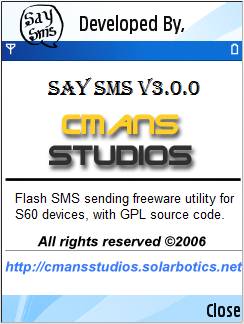
The software targets Series60 Symbian9.x Mobile Phone devices, providing instant messaging of Class 0 or Class0 SMS (Flash SMS) facility over the GSM network. The SMS sent via this software will be directly displayed over the desktop screen in the remote mobiles than going into the Inbox. The software can be used in environments where the announcement information for immediate notice is required or to just crack a joke. Once the message is read the background MTM system automatically deletes the message and won't be available in the Inbox.

Sending Flash SMS with SaySMS:

• Open SaySMS from the Applications folder of the phone's menu
• Launch SaySMS Application from the list
• Type the required message in the text editor.
• From Options menu choose Send command, which by default opens the phonebook view listing the entries in phonebook to choose recipients.
• Select the recipients from the phonebook entries if it is available. Now with v3.0.0 selection of multiple recipients to send simultaneously is allowed. Press OK. New menu is shown with the particular number to choose, if multiple phone numbers exits for same phonebook entry. Select one number for every recipient.
• If the number of the recipient is not available in phonebook, press Back option. Now the window asking for manual entry of the phone number pops.
• Enter the phone number manually and press OK.
• A Billability Statement saying that sending of SMS may be charged by the service provider. Press Ok so that message will be sent. [The billability statement display can be disabled via settings].

Importing the messages from Inbox

SaySMS is usually used in the context of sending forward messages or cracking a simple joke. So this needs to copy messages from the inbox. V3.0.0 comes with a feature where we can import messages from inbox.
• Open Options>Import from Inbox, select the available message from Inbox and press OK.

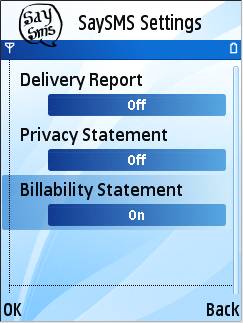
Settings

We can control functional behaviour of SaySMS by modifying the settings.

• Enable/Disable Delivery Report
• Enable/Disable Billability Statement
• Enable/Disable Privacy Statement

Download :

Click to download from Ziddu
Or
Click to download from KewlShare

Read more and download...


Insy TV is the first implementation of the nonlinear signaled television concept. This first version has materialized mainly as a video messaging application. If you ever wondered if it is possible to send live video messages from one mobile phone to another for free, then you have already understood what Insy TV is all about.

And that is not all that Insy can do. Broadcasting worldwide is the other nice feature included in the first release. It would be fun and entertaining to watch what other members of the community have decided to share. And you can always post live or pre-uploaded video clips. Professional television productions will soon be part of Insy TV: your preferred channels, sport shows and essential economic and social news, all would be available in the TVBox.

Modern mobile phones, connected to Internet, represent the ideal support for implementing a nonlinear signaled television system. They have all needed characteristics: a relatively large screen, high speed Internet connection through the air, video camera
and quality loud speakers. And most important, since they are mobile personal devices we shall find them in the proximity of their owners most of the time and almost everywhere.

Download :

Click to download from Ziddu
Or
Click to download from KewlShare

Read more and download...